Large-scale migrations fail for predictable reasons: unknown dependencies, poorly sequenced waves, and a lack of visibility into what's actually happening across hundreds of servers in flight. The technical act of moving a workload to AWS is well-understood — the hard part is orchestrating the migration of an entire portfolio without breaking things along the way.
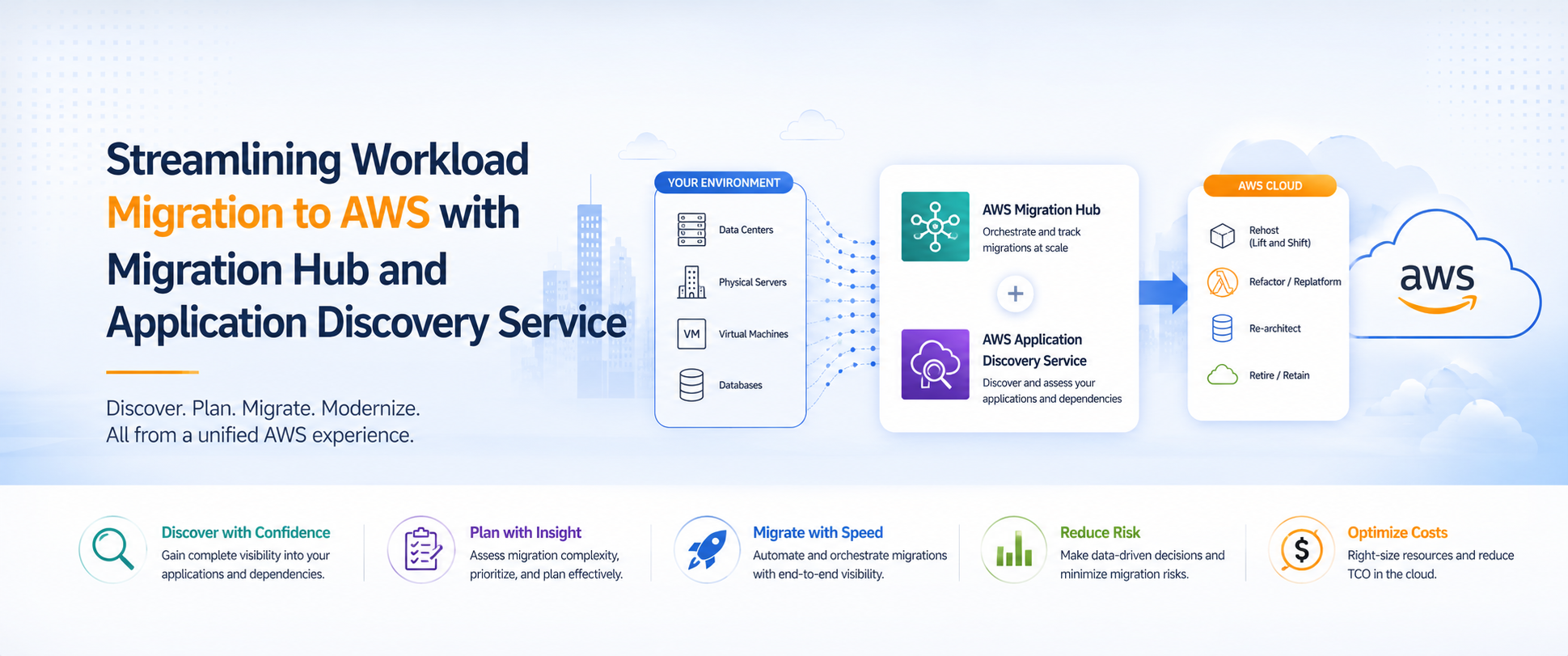
AWS Migration Hub and Application Discovery Service exist to solve this orchestration problem. In this article, we walk through how these tools work together to bring structure, visibility, and confidence to migrations that would otherwise devolve into spreadsheet chaos.
The Problem These Tools Solve
Without centralized discovery and tracking, large migrations typically look like this:
- Manual inventory — someone maintains a spreadsheet of servers, applications, and owners that's outdated the moment it's created.
- Blind dependencies — teams discover that Server A talks to Server B only after Server A has been migrated and Server B's connection breaks.
- No single source of truth — different teams use different tools, and nobody has a unified view of what's been migrated, what's in progress, and what's blocked.
- Wave planning by gut feel — without dependency data, migration waves are sequenced based on assumptions rather than actual communication patterns.
At 10 servers, you can manage this manually. At 100+, it becomes a project risk. At 500+, it's a guaranteed source of outages and delays.
AWS Application Discovery Service
Before you can migrate intelligently, you need to understand what you have — not what you think you have, but what's actually running, how it's configured, and what it talks to.
AWS Application Discovery Service collects this data automatically through two modes:
Agentless Discovery deploys the AWS Agentless Discovery Connector as a VMware appliance in your vCenter environment. It collects VM inventory, configuration data, and performance metrics (CPU, memory, disk I/O) without touching individual servers. This is the fastest path to a baseline inventory and is typically where we start.
Agent-Based Discovery installs a lightweight agent on each server to collect deeper telemetry — running processes, network connections (including port-level communication), and detailed system configuration. This is where dependency mapping becomes possible.
What Discovery Actually Reveals
In our experience, discovery consistently surfaces surprises that would have caused migration failures:
- Undocumented dependencies — legacy applications making API calls or database connections that nobody on the current team knew about.
- Shadow IT — servers running workloads that aren't in any CMDB or asset inventory.
- Overprovisioned infrastructure — servers running at 5-10% CPU utilization that can be significantly right-sized on AWS.
- Unexpected network patterns — cross-environment communication (dev talking to prod, for example) that needs to be addressed before migration.
- End-of-life software — operating systems and database versions that won't be supported on AWS and need to be upgraded as part of the migration.
This data transforms migration planning from guesswork into engineering.
Dependency Mapping: The Most Valuable Output
If there's one capability that justifies the investment in agent-based discovery, it's dependency mapping. By analyzing network connections over a period of weeks, Application Discovery Service builds a map of which servers communicate with which other servers — and on which ports.
This map is the foundation of intelligent wave planning:
- Application grouping — servers that communicate frequently belong in the same migration wave. Migrating them together avoids cross-environment latency and connectivity issues.
- Blast radius containment — if something goes wrong with a wave, the impact is contained to a known set of related servers rather than cascading across unrelated systems.
- Cutover sequencing — within a wave, dependency data tells you which servers need to move first (databases before application servers, for example).
- Risk identification — servers with many inbound connections are high-risk migration candidates that need extra testing and rollback planning.
Without this data, you're sequencing waves based on organizational convenience (by team, by department) rather than technical reality. That's how migrations break things.
AWS Migration Hub: Centralized Tracking
Once discovery is complete and migration execution begins, AWS Migration Hub becomes your single pane of glass. It aggregates status from multiple migration tools — AWS Application Migration Service (MGN), AWS Database Migration Service (DMS), and partner solutions — into a unified dashboard.
Key capabilities:
- Portfolio-level visibility — see all servers across all waves in a single view, with status indicators showing discovered, not started, in progress, and completed.
- Tool-agnostic tracking — whether you're using MGN for lift-and-shift, DMS for databases, or a partner tool for specific workloads, Migration Hub tracks them all.
- Strategy Recommendations — Migration Hub can analyze your discovery data and recommend migration strategies (rehost, replatform, refactor) for each server based on its characteristics.
- Progress reporting — generate reports for stakeholders showing migration velocity, blockers, and projected completion dates.
Why centralized tracking matters at scale:
On a 200-server migration with 8 waves running over 12 weeks, you'll have multiple teams executing simultaneously. Without a single source of truth, status meetings become exercises in reconciling conflicting spreadsheets. Migration Hub eliminates that overhead — everyone looks at the same dashboard, and status updates happen automatically as tools report progress.
Wave Planning in Practice
With dependency data and Migration Hub in place, wave planning becomes a structured exercise:
Wave 0 — Foundation — Landing zone, networking, shared services (Active Directory, DNS, monitoring). Nothing else moves until this is validated.
Wave 1 — Low-risk pilot — A small group of non-critical, low-dependency servers. The goal is to validate the migration process, runbooks, and tooling before touching anything important.
Waves 2-N — Production waves — Grouped by application dependency clusters, sequenced by business criticality and downtime tolerance. Each wave has defined success criteria, testing gates, and rollback procedures.
Final wave — Stragglers and exceptions — Servers with complex dependencies, legacy OS requirements, or political blockers that need special handling.
The key principle: each wave should be independently deployable and independently rollback-able. If Wave 4 has issues, it shouldn't block Wave 5 or require rolling back Wave 3.
Practical Tips from Experience
After executing hundreds of migrations using this toolset, here's what we've learned:
Run discovery for at least 2-3 weeks — network communication patterns vary by time of day, day of week, and business cycle. A single day of discovery data will miss batch jobs, monthly reporting, and weekend maintenance processes.
Don't skip agent-based discovery for critical workloads — agentless gives you inventory, but only agent-based gives you the dependency map. For production workloads, the dependency data is worth the agent deployment effort.
Use Migration Hub from day one — don't wait until execution starts. Import your discovery data early so you can plan waves, assign strategies, and build your migration backlog in the tool rather than in spreadsheets.
Validate dependency maps with application owners — discovery data shows network connections, but it doesn't explain why they exist. Some connections are active dependencies; others are legacy configurations that are no longer needed. Application owners can tell you the difference.
Plan for the 10% that won't migrate cleanly — every large migration has servers that don't fit the standard process. Identify them early, plan for them separately, and don't let them block the other 90%.
How Atayo Uses These Tools
As an AWS Migration Competency Partner, Atayo has built our migration factory methodology around these tools. Every large-scale migration engagement starts with Application Discovery Service to build the dependency map, uses Migration Hub for tracking and reporting, and follows a structured wave plan derived from actual data rather than assumptions.
This approach has delivered:
- 500+ terabytes migrated to AWS
- 220+ successful engagements across healthcare, financial services, transportation, and technology
- $7M+ in MAP funding awarded to clients through the AWS Migration Acceleration Program
Get Started
If you're planning a large-scale migration to AWS and want a structured, data-driven approach — or if you're mid-migration and struggling with visibility and coordination — Atayo can help.
Talk to a migration architect about your environment, or learn more about our Cloud Migration services.
Tags
Atayo Group
AWS-certified cloud practitioners delivering end-to-end cloud solutions and services.
About Atayo →